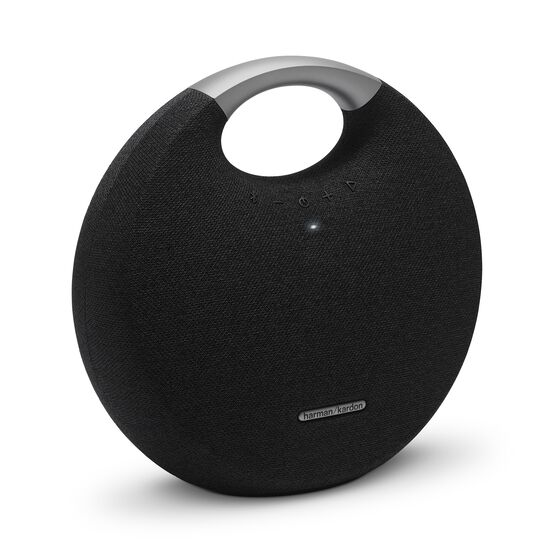


Onyx Studio 5
Details https://id.harmankardon.com/ONYX+STUDIO+5.html?dwvar_ONYX%20STUDIO%205_color=Black-APAC-CurrentSpeaker Bluetooth Portable
Speaker Bluetooth Portable


Streaming Bluetooth Nirkabel
Alirkan musik secara nirkabel melalui Bluetooth untuk menikmati suara yang memenuhi seluruh ruangan. Hubungkan hingga 2 perangkat pintar secara bersamaan dan bergiliran di saat memutar musik.

8 jam waktu putar
Baterai yang dapat diisi ulang mendukung hingga 8 jam waktu bermain.

Nirkabel Suara Ganda
Sambungkan secara nirkabel dua speaker Harman Kardon Onyx Studio 5 untuk pengalaman mendengarkan musik yang lebih baik.

Bahan Premium
Dibuat dari bahan aluminium dan kain yang unik untuk tampilan dan nuansa yang benar-benar elegan.
Pegangan aluminium yang terintegrasi
Pegangan pembawa aluminium terintegrasi untuk portabilitas yang mudah.

Desain Harman Kardon Onyx Studio 5 yang canggih dan khas diekspresikan melalui siluet bulat khasnya, penutup kain premium dari penutup speaker dan pegangan aluminium terintegrasi untuk portabilitas yang mudah. Ditakdirkan untuk menjadi yang terbaik, speaker Bluetooth portabel berfitur lengkap di kelasnya, Onyx Studio 5 menawarkan 8 jam waktu bermain serta suara ganda nirkabel, yang menghubungkan dua speaker Harman Kardon Onyx Studio 5 secara nirkabel untuk meningkatkan pengalaman mendengarkan musik. Menarik perhatian di setiap sudut, Onyx Studio 5 adalah bagian desain ikonik di rumah mana pun.

Spesifikasi General
Ukuran
Spesifikasi Kontrol dan Koneksi
Baterai
Fitur
Spec Sheet (English)
Bahasa Indonesia 2 MBSpec Sheet ()
Bahasa Indonesia 5 MB- 1x Harman Kardon Onyx Studio 5
- 1x Adaptor daya
- 1x Panduan ringkas
- 1x lembar pengaman
- Kartu Garansi 1x

Panduan pemilik terbaru, panduan quick start, dan dokumen.
Onyx Series
\nNote: This action will erase all settings and Bluetooth data from the device. You will be required to pair and connect to your devices again after this action is done.
\n\n
Onyx
\n- Turn the speaker ON
- Press and hold the Bluetooth & Power button for more than 3 seconds
- The speaker will power off and be factory reset
\n
Onyx Mini, Onyx Studio 2, Onyx Studio 3, Onyx Studio 4
\n- Turn the speaker ON
- Press and hold the Volume (+) & Phone button for more than 3 seconds
- The speaker will power off and be factory reset
\n
Onyx Studio
\n- Turn the speaker ON
- Press and hold the Volume (-) & Bluetooth button for more than 3 seconds
- The speaker will power off and be factory reset
\n
Onyx Studio 5, Onyx Studio 6, Onyx Studio 7, Onyx Studio 8, Onyx Studio 9
\n- Turn the speaker ON
- Press and hold the Volume (+) & Bluetooth button for more than 5 seconds
- The speaker will power off and be factory reset
","Answer__c":"
Onyx Series
\nNote: This action will erase all settings and Bluetooth data from the device. You will be required to pair and connect to your devices again after this action is done.
\n\n
Onyx
\n- Turn the speaker ON
- Press and hold the Bluetooth & Power button for more than 3 seconds
- The speaker will power off and be factory reset
\n
Onyx Mini, Onyx Studio 2, Onyx Studio 3, Onyx Studio 4
\n- Turn the speaker ON
- Press and hold the Volume (+) & Phone button for more than 3 seconds
- The speaker will power off and be factory reset
\n
Onyx Studio
\n- Turn the speaker ON
- Press and hold the Volume (-) & Bluetooth button for more than 3 seconds
- The speaker will power off and be factory reset
\n
Onyx Studio 5, Onyx Studio 6, Onyx Studio 7, Onyx Studio 8, Onyx Studio 9
\n- Turn the speaker ON
- Press and hold the Volume (+) & Bluetooth button for more than 5 seconds
- The speaker will power off and be factory reset
","ArticleType":"How_Tos__kav"},{"attributes":{"type":"Knowledge__kav","url":"/services/data/v45.0/sobjects/Knowledge__kav/ka25d000000Xj7cAAC"},"Title":"Is the Dual Wireless Sound for the Onyx Studio 5 compatible with the Onyx Studio 3 that also features the Dual Wireless Sound?","Id":"ka25d000000Xj7cAAC","ArticleNumber":"000031304","Question__c":"Is the Dual Wireless Sound for the Onyx Studio 5 compatible with the Onyx Studio 3 that also features the Dual Wireless Sound?*","Process__c":"No. The Dual Wireless Sound featured in the Onyx Studio 5 only gives you the capability to connect to a second Onyx Studio 5. It is not possible to connect the Onyx Studio 3 and 5 together. The Onyx Studio 5 can only be connected to no more than one other Onyx Studio 5.","Answer__c":"No. The Dual Wireless Sound featured in the Onyx Studio 5 only gives you the capability to connect to a second Onyx Studio 5. It is not possible to connect the Onyx Studio 3 and 5 together. The Onyx Studio 5 can only be connected to no more than one other Onyx Studio 5.","ArticleType":"How_Tos__kav"}]}


