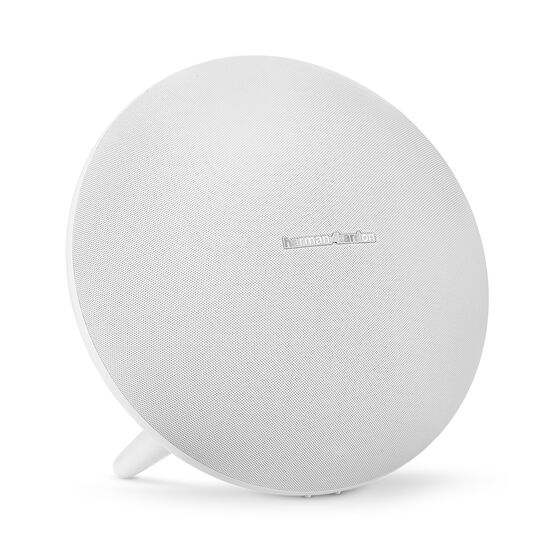


Harman Kardon Onyx Studio 4
Details https://id.harmankardon.com/ONYX+STUDIO+4.html?dwvar_ONYX%20STUDIO%204_color=White-USA-CurrentSpeaker Bluetooth Portable
Speaker Bluetooth Portable


Streaming Bluetooth Nirkabel
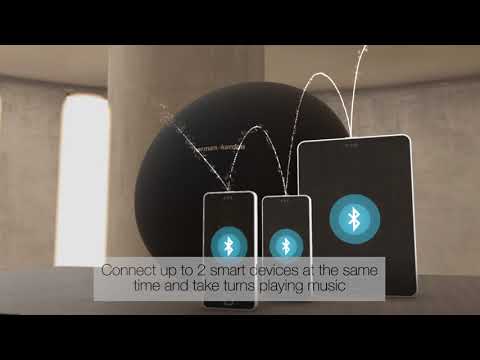
Alirkan musik secara nirkabel melalui Bluetooth untuk menikmati suara yang memenuhi ruangan. Hubungkan hingga 2 perangkat pintar secara bersamaan dan bergiliran memutar musik.

8 jam waktu putar
Baterai yang dapat diisi ulang mendukung hingga 8 jam waktu bermain

HK Connect +
Perkuat pengalaman mendengar Anda dengan menghubungkan lebih dari 100 speaker yang diaktifkan HK Connect + tanpa kabel.

Sistem Konferensi dengan Mikrofon Bawaan
Peredam kebisingan dan gema memungkinkan konferensi sejernih kristal.
Integrasi Suara
Akses Siri atau Google Now dari speaker dengan menekan tombol sederhana. Ini dapat dengan mudah dikonfigurasi melalui Aplikasi HK Connect.
Bahan Premium
Kain dan finishing yang superior dikombinasikan dengan desain ikonik untuk melengkapi gaya apa pun.
Sistem Speaker Nirkabel Harman Kardon Aura Plus memiliki suara yang begitu kaya dan memuaskan seperti penampilannya. Dengan driver 6 X 1,5 "jarak menengah dan tinggi serta subwoofer 4,5" yang menghasilkan suara Omni-directional, 360º, Aura Plus mengemas pukulan yang jauh lebih besar daripada yang disarankan oleh jejak sederhana. Dilengkapi dengan bahan-bahan premium dan fitur-fitur elit - termasuk built-in Bluetooth® untuk mengalirkan audio dari perangkat Bluetooth® Anda, Wifi untuk Apple AirPlay, Spotify Connect dan DLNA streaming pada jaringan rumah Anda - Harman Kardon Aura Plus memberikan tampilan dan perasaan Anda ' Saya akan dengan bangga memasukkannya ke dalam rumah Anda. Dari pemanggang kain premium hingga penutup transparan - yang memungkinkan Anda melihat ke dalam untuk mengamati subwoofer dan rumah logam yang dibuat khusus serta LED yang menyala - harapan Anda sendiri akan selamanya diubah. Gunakan aplikasi Harman Kardon Remote untuk memandu Anda melalui pengaturan yang disederhanakan, memberi Anda kendali penuh atas ekosistem Harman Kardon nirkabel Anda. Aura Plus berdiri sendiri di dunia pembicara saya-terlalu saat itu jelas menunjukkan dan menunjukkan bahwa kecantikan dapat terdengar sebagai menakjubkan seperti yang terlihat.
Spesifikasi General
Ukuran
Spesifikasi Kontrol dan Koneksi
Baterai
Spec Sheet (English)
Bahasa Indonesia 709 KB- 1 x Harman Kardon Onyx Studio 4
- 1 x Adaptor daya
- 1 x Panduan ringkas
- 1 x lembar pengaman
- 1 x Kartu garansi

Panduan pemilik terbaru, panduan quick start, dan dokumen.
Onyx Series
\nNote: This action will erase all settings and Bluetooth data from the device. You will be required to pair and connect to your devices again after this action is done.
\n\n
Onyx
\n- Turn the speaker ON
- Press and hold the Bluetooth & Power button for more than 3 seconds
- The speaker will power off and be factory reset
\n
Onyx Mini, Onyx Studio 2, Onyx Studio 3, Onyx Studio 4
\n- Turn the speaker ON
- Press and hold the Volume (+) & Phone button for more than 3 seconds
- The speaker will power off and be factory reset
\n
Onyx Studio
\n- Turn the speaker ON
- Press and hold the Volume (-) & Bluetooth button for more than 3 seconds
- The speaker will power off and be factory reset
\n
Onyx Studio 5, Onyx Studio 6, Onyx Studio 7, Onyx Studio 8, Onyx Studio 9
\n- Turn the speaker ON
- Press and hold the Volume (+) & Bluetooth button for more than 5 seconds
- The speaker will power off and be factory reset
","Answer__c":"
Onyx Series
\nNote: This action will erase all settings and Bluetooth data from the device. You will be required to pair and connect to your devices again after this action is done.
\n\n
Onyx
\n- Turn the speaker ON
- Press and hold the Bluetooth & Power button for more than 3 seconds
- The speaker will power off and be factory reset
\n
Onyx Mini, Onyx Studio 2, Onyx Studio 3, Onyx Studio 4
\n- Turn the speaker ON
- Press and hold the Volume (+) & Phone button for more than 3 seconds
- The speaker will power off and be factory reset
\n
Onyx Studio
\n- Turn the speaker ON
- Press and hold the Volume (-) & Bluetooth button for more than 3 seconds
- The speaker will power off and be factory reset
\n
Onyx Studio 5, Onyx Studio 6, Onyx Studio 7, Onyx Studio 8, Onyx Studio 9
\n- Turn the speaker ON
- Press and hold the Volume (+) & Bluetooth button for more than 5 seconds
- The speaker will power off and be factory reset
","ArticleType":"How_Tos__kav"},{"attributes":{"type":"Knowledge__kav","url":"/services/data/v45.0/sobjects/Knowledge__kav/ka25d000000Xj6EAAS"},"Title":"How do I power on and pair the Onyx Studio 4?","Id":"ka25d000000Xj6EAAS","ArticleNumber":"000034350","Question__c":"How do I power on and pair the Onyx Studio 4?","Process__c":"Make sure that the unit you are attempting to connect to is in pairing mode under Bluetooth Settings. Press the power button located on far right outer rim of the speaker. If this is the first time connecting the unit, it will immediately go into pairing mode. HK Onyx 4 Studio should show up on your discoverable devices within 3-5 seconds. Once you choose the HK Onyx Studio 4 on your device, you will be connected and ready to experience that superior Harman Kardon sound.","Answer__c":"Make sure that the unit you are attempting to connect to is in pairing mode under Bluetooth Settings. Press the power button located on far right outer rim of the speaker. If this is the first time connecting the unit, it will immediately go into pairing mode. HK Onyx 4 Studio should show up on your discoverable devices within 3-5 seconds. Once you choose the HK Onyx Studio 4 on your device, you will be connected and ready to experience that superior Harman Kardon sound.","ArticleType":"How_Tos__kav"},{"attributes":{"type":"Knowledge__kav","url":"/services/data/v45.0/sobjects/Knowledge__kav/ka25d000000Xj5tAAC"},"Title":"How do I use the HK Connect feature on the Onyx Studio 4?","Id":"ka25d000000Xj5tAAC","ArticleNumber":"000034505","Question__c":"How do I use the HK Connect feature on the Onyx Studio 4?","Process__c":"Download the HK Connect app to your mobile device. Make sure that the Onyx Studio 4 speaker is connected successfully to your mobile device. The HK Connect app should recognize the Onyx Studio 4 within the first few seconds. Once inside the app you can activate the voice assistant and connect to other Connect+ Harman Kardon devices.","Answer__c":"Download the HK Connect app to your mobile device. Make sure that the Onyx Studio 4 speaker is connected successfully to your mobile device. The HK Connect app should recognize the Onyx Studio 4 within the first few seconds. Once inside the app you can activate the voice assistant and connect to other Connect+ Harman Kardon devices.","ArticleType":"How_Tos__kav"},{"attributes":{"type":"Knowledge__kav","url":"/services/data/v45.0/sobjects/Knowledge__kav/ka25d000000Xj7GAAS"},"Title":"What is connect+?","Id":"ka25d000000Xj7GAAS","ArticleNumber":"000031470","Question__c":"What is connect+?","Process__c":"JBL Connect+ can wirelessly link more than 100 JBL Connect+ enabled speakers together to amplify the party","Answer__c":"JBL Connect+ can wirelessly link more than 100 JBL Connect+ enabled speakers together to amplify the party","ArticleType":"How_Tos__kav"}]}


