


Harman Kardon Aura Studio 4
Details https://id.harmankardon.com/AURASTUDIO4.html?dwvar_AURASTUDIO4_color=Black-APAC-CurrentSpeaker Bluetooth dengan kubah transparan yang ikonis dan pencahayaan bertema.
Speaker Bluetooth dengan kubah transparan yang ikonis dan pencahayaan bertema.


Suara Harman Kardon yang Indah
Mendengarkan musik sebagaimana seharusnya didengar. Musik Anda direproduksi dengan akurasi yang tepat, berkat saluran speaker yang berbeda dan amplifier khusus, yang mereproduksi setiap detail sonik dengan kejernihan yang memukau. Rasakan setiap hentakan dari subwoofer 5,2" yang memperkuat nada bass yang dalam dan kaya. Dan soundstage yang luas dari rangkaian 6 speaker adalah hal terbaik berikutnya untuk menikmati lagu favorit Anda secara langsung.

Pencahayaan efek berlian unik yang menari mengikuti musik
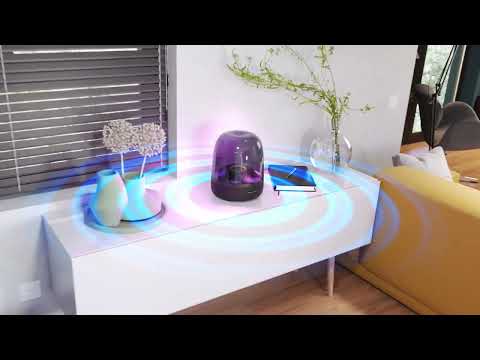
Kubah transparan khas Aura Studio 4 memperkuat dan memancarkan pencahayaan sekitar yang elegan ke segala arah. Terinspirasi oleh keindahan alam, pola dan warna yang bergeser dari pencahayaan efek berlian membawa rasa keajaiban yang sama ke setiap ruang. Pilih antara 5 tema animasi berbeda yang sesuai dengan suasana musik Anda—dan manjakan indra Anda.

Streaming musik Bluetooth
Daftar putar digunakan untuk berbagi—itulah sebabnya Aura Studio 4 berpasangan dengan perangkat seluler apapun untuk streaming nirkabel yang lancar.

Bahan daur ulang
Dengarkan lebih hijau. Aura Studio 4 memadukan aluminium, kain, dan plastik daur ulang, dan dikemas menggunakan kertas bersertifikat FSC ramah lingkungan dan tinta berbahan dasar kedelai.
Inspirasikan indra Anda dengan lampu memesona yang menari mengikuti irama suara Harman Kardon yang indah.
Kubah transparan Aura Studio 4 yang ikonis memancarkan pola berlian menawan yang bersinar ke segala arah. Cocokkan salah satu dari 5 tema animasi berbeda dengan irama musik Anda. Atmosfer visual yang rimbun sama menariknya dengan nada bass speaker yang kuat dan audio yang jernih dan luas.
Ciptakan pengalaman tak terlupakan dengan memasangkan speaker dengan lebih dari satu perangkat seluler, sehingga semua orang dapat berbagi suasana hati mereka sendiri.
Spesifikasi General
Spesifikasi Audio
Ukuran
Spesifikasi Kontrol dan Koneksi
Spec Sheet (English)
Indonesia 920 KBSpec Sheet ()
Indonesia 4 MB- 1x Harman Kardon Aura Studio 4
- 1x Kabel Daya AC
- 1x Panduan memulai cepat
- 1x Lembar panduan keselamatan
- 1x Kartu garansi

Panduan pemilik terbaru, panduan quick start, dan dokumen.
Aura Studio Series
\nNote: This action will erase all settings and Bluetooth data from the device. You will be required to pair and connect to your devices again after this action is done.
\n\n
Aura Studio, Aura Studio 2
\n- Turn the speaker ON
- Press and hold the Volume (+) & Phone button for more than 5 seconds
- All LED indicators will flash and the speaker will power off and be factory reset
\n
Aura Studio 3
\n- Turn the speaker ON
- Press and hold the Light Effect button for more than 10 seconds
- The speaker will power off and be factory reset
\n
Aura Studio 4
\n- Turn the speaker ON
- Press and hold the Volume (+) & Bluetooth button for more than 5 seconds
- The speaker will power off and be factory reset
\n
Aura Studio 5, Aura Studio 5 Wi-Fi
\n- Turn the speaker ON
- Press and hold the Light Mode, Vol +, & Vol - button for more than 7 seconds
- The speaker will power off and be factory reset
Or alternatively;
\n\n
- Open your Harman Kardon One App.
- Navigate to the support tile.
- Select RESTORE FACTORY SETTINGS.
Aura Studio Series
\nNote: This action will erase all settings and Bluetooth data from the device. You will be required to pair and connect to your devices again after this action is done.
\n\n
Aura Studio, Aura Studio 2
\n- Turn the speaker ON
- Press and hold the Volume (+) & Phone button for more than 5 seconds
- All LED indicators will flash and the speaker will power off and be factory reset
\n
Aura Studio 3
\n- Turn the speaker ON
- Press and hold the Light Effect button for more than 10 seconds
- The speaker will power off and be factory reset
\n
Aura Studio 4
\n- Turn the speaker ON
- Press and hold the Volume (+) & Bluetooth button for more than 5 seconds
- The speaker will power off and be factory reset
\n
Aura Studio 5, Aura Studio 5 Wi-Fi
\n- Turn the speaker ON
- Press and hold the Light Mode, Vol +, & Vol - button for more than 7 seconds
- The speaker will power off and be factory reset
Or alternatively;
\n\n
- Open your Harman Kardon One App.
- Navigate to the support tile.
- Select RESTORE FACTORY SETTINGS.
Use a clean damp cloth to gently scrub the surface.
Do not use bleach-based products or a dry cloth as it might potentially scratch the transparent dome.
","Answer__c":"Use a clean damp cloth to gently scrub the surface.
Do not use bleach-based products or a dry cloth as it might potentially scratch the transparent dome.
","ArticleType":"How_Tos__kav"}]}


