


Aura Studio 3
Details https://id.harmankardon.com/AURA+STUDIO+3.html?dwvar_AURA%20STUDIO%203_color=Black-APAC-CurrentSpeaker bluetooth
Speaker bluetooth


Desain khas dan elegan
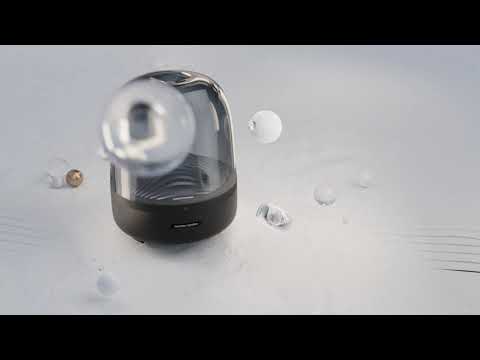
Seni suara yang menawan. Dengan desain dome, bahan premium, dan efek cahaya sekitar, Harman Kardon Aura Studio 3 yang ikonik menyampaikan kesan modern di rumah Anda.

Suara 360-derajat yang luar biasa
Perpaduan gaya dan fungsi. Speaker Harman Kardon Aura Studio 3 menghadirkan suara 360 derajat yang luar biasa. Suara lebih dinamis berkat subwoofer yang bertenaga, menyajikan pengalaman mendengar yang menghanyutkan.
Cahaya sekitar
Efek cahaya riak air yang elegan menghadirkan nuansa tenang di ruangan Anda. Jadikan setiap kegiatan mendengar memanjakan telinga dan mata Anda.

Streaming nirkabel dengan Bluetooth
Streaming musik tanpa kabel lewat Bluetooth untuk menikmati suara yang memenuhi seisi ruangan.
Ikonik di setiap tempat
Letakkan Harman Kardon Aura Studio 3 di mana saja dalam rumah Anda. Bentuknya yang elegan dan ukurannya yang mungil, menawarkan fitur menakjubkan yang berpadu serasi dengan dekorasi Anda.
Sempurnakan rumah Anda dengan desain ikonik Harman Kardon Aura Studio 3 yang tak lekang oleh waktu dan menghadirkan suara 360 derajat yang menawan. Speaker bluetooth menakjubkan yang tampilan dan suaranya sama-sama bagus. Speaker ini memadukan audio penuh dengan efek cahaya sekitar yang terpadu, gerakan riak air agar Anda menikmati musik dengan cara baru yang tampilannya dinamis. Dengan desain dome dan ukuran yang kecil, speaker ini melebur dengan dekorasi ruangan rumah Anda dengan cantiknya.
Spesifikasi General
Spec Sheet (English)
Indonesia 1 MBSpec Sheet ()
Indonesia 2 MB- 1x Harman Kardon Aura Studio 3
- 1x Kabel daya
- 1x Panduan memulai cepat
- 1x Lembar panduan keselamatan
- 1x Kartu garansi

Panduan pemilik terbaru, panduan quick start, dan dokumen.
Aura Studio Series
\nNote: This action will erase all settings and Bluetooth data from the device. You will be required to pair and connect to your devices again after this action is done.
\n\n
Aura Studio, Aura Studio 2
\n- Turn the speaker ON
- Press and hold the Volume (+) & Phone button for more than 5 seconds
- All LED indicators will flash and the speaker will power off and be factory reset
\n
Aura Studio 3
\n- Turn the speaker ON
- Press and hold the Light Effect button for more than 10 seconds
- The speaker will power off and be factory reset
\n
Aura Studio 4
\n- Turn the speaker ON
- Press and hold the Volume (+) & Bluetooth button for more than 5 seconds
- The speaker will power off and be factory reset
\n
Aura Studio 5, Aura Studio 5 Wi-Fi
\n- Turn the speaker ON
- Press and hold the Light Mode, Vol +, & Vol - button for more than 7 seconds
- The speaker will power off and be factory reset
Or alternatively;
\n\n
- Open your Harman Kardon One App.
- Navigate to the support tile.
- Select RESTORE FACTORY SETTINGS.
Aura Studio Series
\nNote: This action will erase all settings and Bluetooth data from the device. You will be required to pair and connect to your devices again after this action is done.
\n\n
Aura Studio, Aura Studio 2
\n- Turn the speaker ON
- Press and hold the Volume (+) & Phone button for more than 5 seconds
- All LED indicators will flash and the speaker will power off and be factory reset
\n
Aura Studio 3
\n- Turn the speaker ON
- Press and hold the Light Effect button for more than 10 seconds
- The speaker will power off and be factory reset
\n
Aura Studio 4
\n- Turn the speaker ON
- Press and hold the Volume (+) & Bluetooth button for more than 5 seconds
- The speaker will power off and be factory reset
\n
Aura Studio 5, Aura Studio 5 Wi-Fi
\n- Turn the speaker ON
- Press and hold the Light Mode, Vol +, & Vol - button for more than 7 seconds
- The speaker will power off and be factory reset
Or alternatively;
\n\n
- Open your Harman Kardon One App.
- Navigate to the support tile.
- Select RESTORE FACTORY SETTINGS.


